
An AI agent can report failure after it has already changed a record
A convincing demo is not enough. Count the exception queue, test failed actions, and price only the jobs that…

The short version
- A no-code AI agent builder should save more work than it returns through human review, corrections, and upkeep.
- Twenty five-minute reviews consume one hundred minutes daily, leaving only twenty minutes saved against a two-hour manual process.
- Buyers should compare total operating cost per verified completed job and test exceptions, permissions, and failures before committing.
My no-code AI agent builder rule: budget the babysitting
I won’t buy an AI agent that quietly gives someone a second job. Five minutes of review, twenty times a day: that hypothetical workflow eats an hour and forty minutes before anyone fixes a mistake.
The subscription gets a pricing page. The babysitting lands on Maya, apparently sitting around waiting for more work.
My buying rule for a no-code AI agent builder: save more work than you send back. I’ll pay for useful judgment and keep human approval on sensitive actions. But who receives the exceptions, and can they handle them?
As a founder, I find clever demos dangerously persuasive. Give me a branching workflow and I’ll rearrange boxes like I’m furnishing an apartment I cannot afford. So I start with whoever has to live in it.
I give the exception queue an owner
For incoming leads, I’d start with: “We need this for our European office before renewal.” Interpreting need and timing deserves judgment. Assigning the account’s existing owner can follow a fixed rule.
Maya would review unclear requests, receiving the original text and a proposed next step. Twenty five-minute reviews mean a hundred minutes of daily handling. Against a two-hour manual process, that saves twenty minutes before upkeep; against four hours, it looks considerably better. I’d also check arrival times: a manageable daily average can still wreck someone’s afternoon. If Maya cannot clear the queue in her available hours, I’d narrow the task. A more elaborate builder comes later.
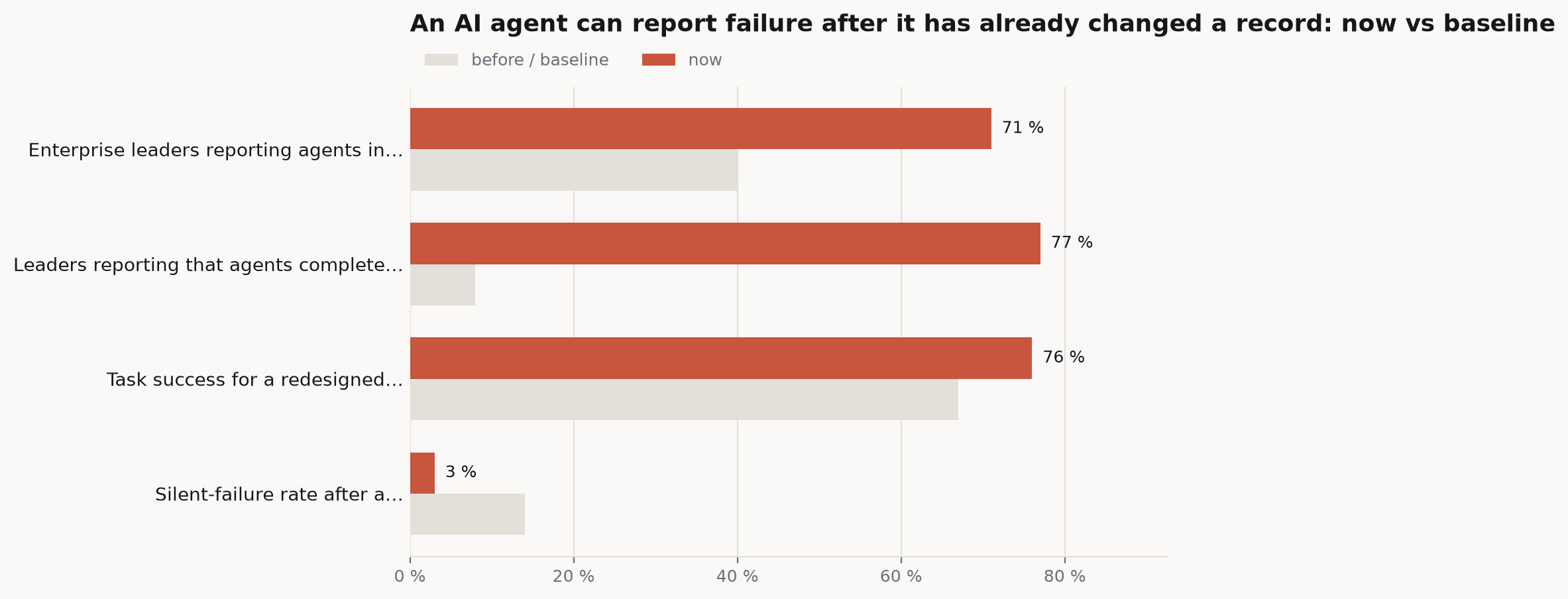
Zapier’s 2026 survey gives me reason to take deployment seriously: 71% of enterprise leaders reported agents in production, versus 40% in the prior survey. It covered more than five hundred leaders, relied on self-reporting, and wasn’t specific to no-code builders. That supports adoption, not predictions about Maya’s workload.
I also want “independent” defined in the vendor’s demo. Does the agent finish correctly, stop somewhere sensible, or declare victory while leaving somebody else to reconstruct the task?
For my lead workflow, I’d define acceptance before opening an editor: identify the account, attach the request correctly, and leave uncertain cases for Maya. External outreach needs approval. Without a reliable account match, a request stays unresolved.
Rewarding an answer every time invites confident nonsense from missing information. I’d rather receive an honest unresolved case than discover a beautiful email went to the wrong buyer.
My first demo input: that European-office request with the account name removed.
I audition the connections before the editor
A Salesforce logo tells me little. Can the connection retrieve the account relationships I need and put the result where someone already works?
Make’s documentation shows how conversational building works: I describe a workflow, and the platform creates a scenario with connected apps and a schedule. Maia’s plan mode lets me inspect proposed modules, connections and assumptions before approving changes. I’d check the source of account context and what the scenario can change. Once running, an agent can call automations as tools; Make executes repeatable steps and handles retries and errors. That gives my fixed routing rule a home instead of asking a model to reconsider it every time. Output in a separate chat window still leaves me a transfer job to assign.
Microsoft’s Copilot Studio describes a similar path from a business need, informed by existing files and policies, to a solution combining an app, approval workflows and an agent for exceptions. I’d examine it for Microsoft-centered work. Either way, I must define completion and when execution stops.
Gong’s example clarifies the value of context. A buyer-interest signal connects to account activity and sales context, triggering outreach drafting, a Slack notification and a review task. I’d ask to see those relationships with my messy records. A polished draft about the wrong opportunity means little.

Sometimes I’d buy a packaged, bounded process. Firmly describes Ask Agent as combining catalog discovery with in-chat checkout on existing commerce infrastructure. Finishing checkout can remove a merchant handoff that recommendation-only assistants leave behind.
Kumar Senthil explains the appeal in firmly’s announcement:
AI is quickly creating new storefronts for commerce, but merchants cannot build a new integration every time one emerges.
I get the pitch. Firmly describes its merchant connection as requiring zero engineering effort; the same announcement says adding Ask Agent to a website takes a line of JavaScript. Both can be true if deployment is simple, but who adds that line and owns it afterward? The announcement doesn’t establish the effort involved.
It also supplies no sample sizes or comparison methodology for its reported conversion and order-value improvements. I’d need those before budgeting the uplift.
I test what happens after the tool misbehaves
For my lead workflow, account lookup and external email get separate permissions. Then I’d test a failure normal demos conveniently avoid: a tool changes something but returns no clear response.
Microsoft’s loop guidance explains the danger of ambiguous tool errors: an update may complete despite a failure response. Blind retries can duplicate the action, leaving somebody to clean up and determine which copy is authoritative. I’d require checking the existing record before repeating a change, plus a retry limit. On escalation, Maya needs to know what changed and what remains uncertain. “Something went wrong” is an error message I could have written myself.
That guidance concerns the GitHub Copilot harness. Each builder must demonstrate its own behavior; I wouldn’t assume equivalent controls.
Then I’d test hostile input. A lead message can instruct the agent to ignore its assignment or send account information elsewhere. Classification requires reading the message, so the boundary must survive contact with that text.
Zack Korman puts the limits of relying on model behavior bluntly in ITPro:
But it can’t be the entire plan for safety and security. It’s like saying your plan for handling insider threats is to only hire nice people.
Another boundary sits beyond what the model sees. Research on malicious changes to previously trusted tools describes the flaw in defenses inspecting only model-visible content: updated tool code executes outside the model’s context window. I’d ask how tool changes get reviewed and what implementation changes do to existing approvals.
Proofpoint’s proof of concept adds a permission problem. Consent to a malicious agent blueprint enabled tenant-local agent identities that could inherit granted permissions. The researchers had not identified in-the-wild activity. I’d question the consent path without calling the demonstration a documented breach.
Public evidence is thin enough that I’d distrust a vague “enterprise-grade” answer. Pith Review found a published prompt-injection rate for only one of sixteen products on its selected pages; some pages were inaccessible, and the available rate came from vendor tests. Transfer to my tools and permissions remains unknown.
The research’s intent-graph audit wouldn’t reassure me yet: its tested agent had no baseline attack success, leaving end-to-end attack prevention unvalidated. I’d still need to watch the builder refuse an action its tools technically permit.
I price jobs that actually pass inspection
A completion message earns no credit until I inspect the resulting record. I’d give each candidate the same representative requests, including missing account information and a tool timeout, and acceptance rules.
The preprint Done Is Not Correct supports separating the artifact from the agent’s claim. In a CAD benchmark, silent failures fell from about 14% with single-shot agents to about 3% with a measure-before-completion loop. The evaluation covered thirteen specification tasks and four models, not CRM work or no-code builders. I can borrow the checking principle without forecasting that improvement for my sales queue.
For each candidate, I’d record original handling time and remaining review and correction time. I’d assign upkeep to a named owner, even with a rough estimate, then add subscription and usage charges, including failed, useless runs. Total operating cost divided by verified completed jobs gives me a comparison across builders. I’d track turnaround too: cheap workflows that miss customer deadlines still fail acceptance. Easier inputs or looser checking for one candidate make this a pricing-page beauty contest. I already know how to waste an afternoon on those.
Usage needs its own check. A November 2026 pricing calculation in the Zapier Central review puts an AI by Zapier step with two tool calls at fifteen tasks on Premium versus nine on Advanced. It assumes the stated tier multipliers and excludes other Zap steps. I’d price the whole workflow before choosing the cheaper plan.
I’ll concede something against my preference for simpler designs: adding agents can help. In a controlled preprint across thirteen enterprise-style procedures, a targeted multi-agent redesign reached 76% task success versus 67% for the single-agent baseline, holding the model, tasks and tools fixed.
That earns attention. The same research found no universally best architecture; coordinated designs generally used more tokens and added latency for usually small, rarely significant gains. Only the targeted redesign significantly beat the baseline. I’d pay for demonstrated improvement, not give every box in a diagram its own budget on aesthetic grounds.
The supplied research still lacks independent, comparable measurements of business outcomes and total operating costs for specific builders on the same real workflows. That leaves me running a local pilot, with all the inconvenience that phrase politely conceals.
I’d also schedule reruns of difficult cases after material changes. Someone must own the workflow after its builder gets excited about something else. I recognize that person. Frequently, he is me.
Before signing, I’d open Maya’s queue and try resolving an exception using only what arrived. If I must hunt through several apps to reconstruct events, those minutes count.
Then I’ll send the vendor one more request with the account name missing and see whether their beautiful demo knows how to wait.
Frequently asked questions
How do you calculate the real cost of a no-code AI agent builder?
A no-code AI agent builder’s operating cost includes subscription fees, usage charges, human review, corrections, and upkeep. Usage charges must include failed and useless runs. Dividing total operating cost by verified completed jobs creates a comparison across builders, while turnaround time shows whether the workflow meets customer deadlines.
What should you test before buying a no-code AI agent builder?
A no-code AI agent builder should be tested with representative requests, missing account information, tool timeouts, and hostile input. Evaluation should verify the resulting records, approval boundaries, retry limits, and escalation details. Each candidate needs the same acceptance rules, including when an uncertain case must remain unresolved.
How much human review can an AI agent workflow require?
Human review depends on exception volume and handling time. Twenty reviews lasting five minutes each require one hundred minutes daily. Against a two-hour manual process, that leaves twenty minutes saved before upkeep. Arrival times also matter because a manageable daily average can still overwhelm the person responsible for exceptions.
Sources
- Turn revenue signals into revenue action with Gong Agent Builder
- Agents: November 2026 release notes
- Using Integrations in Oracle Integration 3
- HubSpot Q3 2026 Earnings Call
- firmly Raises $15 Million Series A and Launches Ask Agent to Help Merchants More Easily Adopt Agentic Commerce
- 7 Agent Builders for Marketing Teams That Don’t Code